
Your mission companions
Keycat and Mauchu
Tap a key. Click a mouse.
These two are by your side, each with their own special skills.

Keyboard practice helper
Keycat
From “key” + “cat”
"You'll be able to do it with just a keyboard. Try it with me."
A softly rounded cat shaped like a keycap. Keycat helps you learn to work with the keyboard, offers hints when you get stuck, and celebrates your progress.
Each Keycat carries a key name on its back: Ctrl, Shift, Alt and more. Choose “See which keys to press” during a mission to meet the cats carrying the keys you need next.
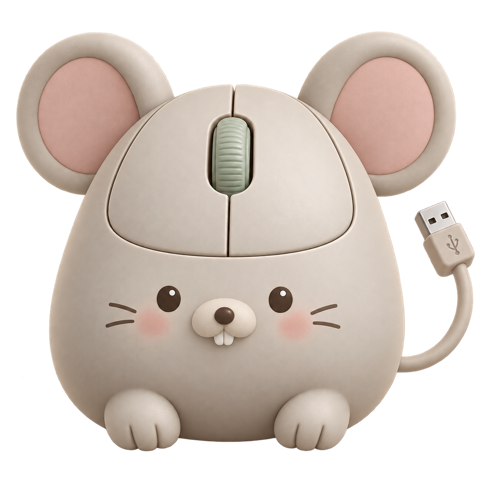
A friendly advocate for the mouse
Mauchu
From “mouse” + “chu,” a mouse’s squeak in Japanese
“Hey, the mouse is handy. Go on, give it a click.”
A little mouse with round ears and tiny front teeth, shaped like a computer mouse. Mauchu has a scroll wheel on his head and a USB cable for a tail. He drops by to whisper how convenient a mouse can be.
These simulation exercises use only the keyboard. Click the sheet and Mauchu sighs: “You can’t use me here.” It is tempting to ask him for help, but today, try the keyboard with Keycat.

Guide to automating work with macros
Macrow
Excel "macro" + owl
"Hoo, isn't that the exact same procedure as last month? If the steps are always the same, I'll remember them for you. Hoo."
A wise owl with a play button on its belly. When it spots a task you repeat the same way every time, it shows you how to turn it into a macro.
In the Macro & VBA practice, you automate invoice creation and totals across several files together with Keycat and Mauchu.
Try macros with Macrow →Their keys tell you who they are.
Use one key or combine several. Learn each shortcut and add to the things you can do.


Meet them in the missions.
Copy cells and move around a worksheet, one keyboard skill at a time.
- Excel simulation practice7 chapters · 39 missionsPractice working in a virtual Excel sheet with just the keyboard, no mouse.Mission list
- PowerPoint simulation practice8 chapters · 36 missionsLearn shortcuts one at a time in a virtual PowerPoint, then combine them. Practice with slides for an internal review meeting.Mission list
- Word Simulation8 chapters · 35 missionsPractice formatting, headings, bullets, line spacing and page breaks in a virtual Word. You work on an internal training notice.Mission list
- PC Simulation8 chapters · 29 missionsPractice copy and paste, undo, find, replace, save and file management in a virtual Notepad and File Explorer.Mission list
- Google Sheets simulation6 chapters · 24 missionsPractice pasting, number formats, row operations, comments and menu search in a virtual spreadsheet. The task is an office supply order sheet.Mission list