
Long Text
Long text typing: hold your quality to the last line
Short drills end before your hands settle. In the long-form test, a continuous business passage scrolls as you type, so the habits that only show up after the first minute — drifting posture, rushed punctuation, the number row — end up in your score. Free, no signup, one or five minutes.
Reviewed on March 2, 2026
How the long-form test works
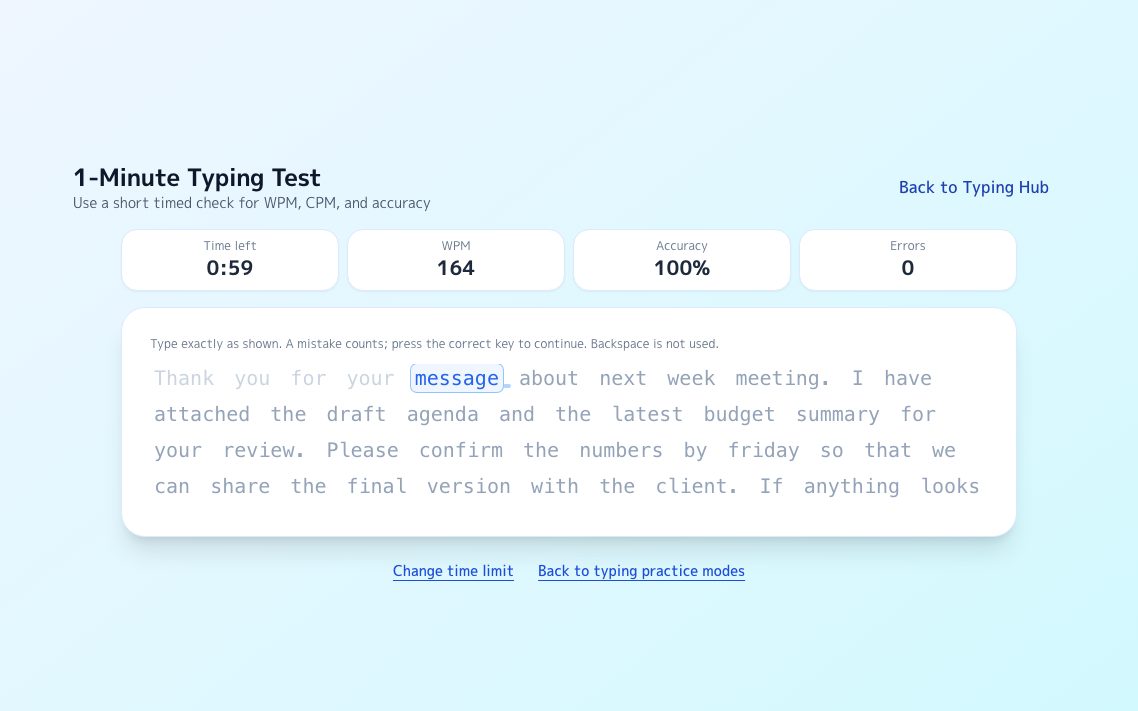
You type the passage one word at a time and press space to move to the next word. The view scrolls line by line as you advance, so you never lose your place, and the run ends when the clock does rather than at the end of a fixed drill.
Mistyped characters do not advance the word, and Backspace is not accepted. You simply type the correct character to continue. Accuracy is then a plain ratio: correct keystrokes divided by all keystrokes, with nothing hidden by corrections.
- Type each word, then space to advance
- A wrong character does not move you forward — retype the right one
- One minute for a quick reading, five minutes for stamina
- WPM, CPM, accuracy, and miss count update while you type
English typing has no conversion step, and that changes what you train
In Japanese or Vietnamese, long text is interrupted constantly: the writer types phonetically and then converts, and every conversion is a small pause where the hands can drift. English has no such step. Every character is one keystroke, and nothing stops the flow between the first word and the last.
That makes English long-form typing a test of endurance rather than of switching. Nothing external breaks your rhythm, so whatever breaks it comes from you: posture that slides, a shift key held a beat too long, a number that pulls the hand off the home row.
- No IME, no dead keys, no accents to compose
- Any standard QWERTY keyboard works as-is
- What you are training is consistency over minutes, not recovery from interruptions
Where long text usually breaks
People who lose accuracy in longer text rarely break down at random. They break down at the same few places, and the real cost is not the first typo — it is the rushed stretch that follows it.
When you miss, slow down for one word instead of speeding up to compensate. The passage is not going anywhere, and one calm word usually costs less time than three hurried corrections.
- Capitals and apostrophes: the shift and the pinky reach pull the hand out of position
- Punctuation: commas and periods invite a sprint into the next word
- Numbers and dates: leaving the number row is easier than coming back to it
- Minute two onwards: the wrists settle and accuracy quietly slides
Reading your result honestly
A single WPM figure says less than the shape of the run. Compare the first half with the second: a fast start that fades means you were typing above your sustainable pace, and the fix is to start slower, not to practice harder.
The one-minute test tells you what your hands can do fresh. The five-minute test tells you what they can do at work, which is the number that actually matters for writing email and documents all day.
Where line breaks and Enter belong
The long-form test deliberately has no Enter key in play: it measures continuous typing, not message structure. Line breaks, send keys, and the accidental half-sent message are a different skill, and they have their own practice.
Once your long-form accuracy holds steady, the chat practice is the natural next step. It uses work-style messages where Enter and newline behaviour matter, which is exactly where a fast typist can still make expensive mistakes.
- Long-form test: continuous typing, speed and stamina
- Chat practice: Enter, newline, and send accuracy on work messages
- Typing practice: short phrases for rhythm when you only have a few minutes
Try a practice
Other typing practice
FAQ
Is the long text typing practice free?
Yes. The one-minute and five-minute long-form tests are free and need no signup. Open the page and start typing.
Can I use Backspace to fix a mistake?
No. A mistyped character simply does not advance the word, so you type the correct character to continue. That keeps accuracy an honest ratio of correct keystrokes to total keystrokes.
What makes long text typing harder than word drills?
You have to hold posture, rhythm, and punctuation stable for minutes rather than seconds. Consistency is the actual challenge, not raw speed.
Should I practice line breaks too?
Line breaks are not part of the long-form test, which measures continuous typing. Use the business chat practice for Enter, newline, and send accuracy.
Is it okay if my speed drops during long text practice?
Speed drops are expected. Accuracy and repeatability should improve first. Speed can grow after that without collapsing quality.